
Want your WordPress theme accepted on WordPress.org? Start by ensuring GPL compliance. The GPL (General Public License) governs WordPress themes, requiring developers to follow specific rules for licensing their code and assets. Non-compliance can lead to rejection from WordPress.org and other platforms, while proper adherence builds trust and opens up opportunities in the WordPress ecosystem.
Here’s what you need to know:
- PHP Files: Must be licensed under GPLv2 (or later) since they are derivative works of WordPress.
- Non-PHP Assets (CSS, JS, Images): Can use GPL-compatible licenses like MIT, BSD, or CC0, but must be documented.
- Documentation: Include a
style.cssheader,license.txt, and a detailedreadme.txtlisting all third-party resources, licenses, and sources. - Third-Party Assets: Verify that all libraries, fonts, and images are GPL-compatible. Avoid sources like Unsplash or Freepik.
- Theme Review: Use tools like the Theme Check plugin to scan for compliance issues before submission.
Key Tip: Always document licenses for every file in your theme. Missing or unclear licenses can result in rejection. Proper compliance isn’t just a requirement – it’s a standard for building trust within the WordPress community.
Core Licensing Requirements for WordPress Themes
When it comes to licensing WordPress themes, the GPL (General Public License) plays a central role. WordPress uses a split licensing model, meaning that while PHP files must adhere to GPL requirements, other assets like CSS, JavaScript, and images can use different licenses – as long as they’re GPL-compatible for themes submitted to WordPress.org.
License PHP Files Under GPLv2 or Later
PHP files in your theme are considered derivative works of WordPress because they depend on WordPress functions to function properly [7][9]. This makes it mandatory to license all PHP files under the GNU General Public License version 2.0 or later.
"PHP in WordPress themes must be GPL, artwork and CSS may be but are not required." – Matt Mullenweg, Co-creator of WordPress [7]
To ensure compliance, include License: and License URI: slugs in your theme’s style.css file header [7][8]. The WordPress.org repository encourages using "GPLv2 or later" to maintain compatibility across the ecosystem [8].
If your theme includes third-party PHP libraries, confirm they are GPL-compatible and document them in a readme.txt or a separate license.txt file [7][8]. Additionally, if you modify or fork GPL-licensed code, retain all existing copyright notices [7].
Once your PHP files are licensed, turn your attention to the licensing of non-PHP assets for full compliance.
Split Licensing for CSS, JavaScript, and Images
While PHP files must follow GPL, non-PHP assets like CSS, JavaScript, and media files are treated differently. These files are considered separate works because they are served as data by the web server and don’t directly interact with WordPress functions [10].
"The CSS files and material contained in the images directory… are works separate from the WordPress code." – James Vasile, Software Freedom Law Center [10]
Even though these assets are technically separate, WordPress.org requires them to be GPL-compatible for themes hosted in its repository [10][7]. Acceptable licenses for non-PHP assets include MIT, BSD, CC0 (Creative Commons Zero), and the SIL Open Font License [7][2].
Document Licenses for All Theme Files
Clearly documenting all licenses is crucial for transparency and to uphold the "copyleft" principles of the GPL in downstream distributions [4].
For files like images and icons, which lack headers, it’s essential to provide a separate text document listing their licenses [4]. Include this information in a centralized file, such as a readme.txt, detailing every third-party resource. This should cover three key elements: the copyright statement, the specific license name, and a source link [2][4].
"Because binary files (such as images) do not have human-readable file headers, the inclusion of copyright, license, and source link in the readme is critical, since otherwise the end user will have no way to know how to find this information." – Chip Bennett, WordPress Themes Team [4]
Themes with incomplete or unclear license documentation may face rejection or removal from WordPress.org if they have three or more unresolved issues [3].
Checking Third-Party Libraries and Resources
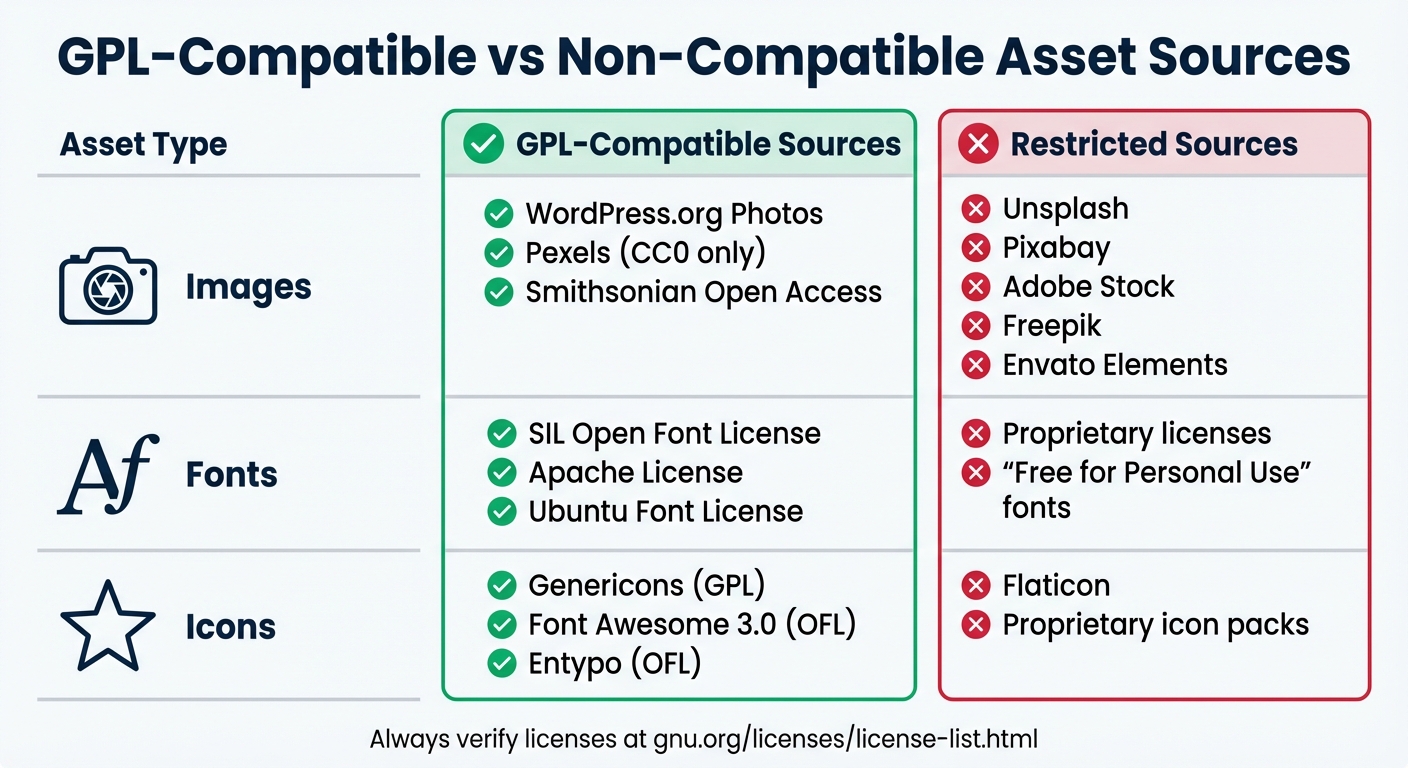
GPL-Compatible vs Non-Compatible Asset Sources for WordPress Themes
To ensure compliance with GPL standards, it’s essential to verify that all third-party assets – whether they’re JavaScript libraries, fonts, or icon sets – meet the required guidelines. WordPress.org mandates that every bundled resource must be 100% GPL-compatible, not just your PHP code [5]. Carefully review all resource folders, including assets, CSS, JavaScript, fonts, icons, and images, to identify any external resources [2].
Once you’ve completed the review, document your findings. For each third-party asset, make a record of the asset’s name, copyright details, license type, and source link [2].
GPL-Compatible and Non-Compatible Licenses
Not all open licenses align with GPL standards. Cross-check your assets against the official GNU list of GPL-compatible licenses [6]. If a license isn’t listed there, it’s generally considered non-compatible. WordPress.org provides clear guidance: “If the license is not listed here, then it’s not compatible: https://www.gnu.org/licenses/license-list.html#GPLCompatibleLicenses” [6].
Be cautious with popular image sources. Platforms like Unsplash, Pixabay, Adobe Stock, Freepik, and Envato Elements are commonly used but do not meet GPL standards. Instead, opt for GPL-compatible alternatives such as the WordPress Photo Directory (wordpress.org/photos), Pexels (CC0-only licenses), or Smithsonian Open Access [6].
For fonts, choose licenses such as the SIL Open Font License (OFL), Apache License, or Ubuntu Font License [6]. While the SIL OFL isn’t technically GPL-compatible, WordPress allows it because it adheres to the core principles of open software [2]. Similarly, for icons, consider sources like Genericons (GPL), Font Awesome 3.0 (OFL), or Entypo (OFL). Avoid proprietary options like Flaticon’s standard license [6].
| Asset Type | GPL-Compatible Sources | Restricted Sources |
|---|---|---|
| Images | WordPress.org Photos, Pexels (CC0 only), Smithsonian Open Access | Unsplash, Pixabay, Adobe Stock, Freepik, Envato Elements |
| Fonts | SIL Open Font License, Apache, Ubuntu Font License | Proprietary licenses; "Free for Personal Use" fonts |
| Icons | Genericons (GPL), Font Awesome 3.0 (OFL), Entypo (OFL) | Flaticon; proprietary icon packs |
Replace or Remove Non-Compliant Assets
If you discover any incompatible assets, replace or remove them immediately [2][5]. For example, swap restricted image sources with alternatives from the WordPress Photo Directory or other CC0 repositories [6]. Ensure that all bundled fonts use approved licenses, such as the SIL OFL [6].
When working with minified JavaScript or CSS files, include their original versions in your theme package [5]. Additionally, all scripts, styles, and images should be bundled within your theme folder rather than hot-linked or served via a CDN – Google Fonts being the only exception [5][11]. After making these changes, update your documentation to reflect the new assets [2][5].
Finally, use the Theme Check plugin to scan for hard-coded external links or CDN-hosted scripts that may violate repository requirements [11][3]. If a third-party library cannot be verified as GPL-compatible and isn’t essential to your theme’s functionality, it’s best to remove it entirely [2][5].
Required Documentation for GPL Compliance
Proper documentation is a cornerstone of ensuring your theme complies with the GPL. Without it, reviewers and users can’t verify whether your theme adheres to licensing requirements. If you’re submitting to the WordPress.org Theme Directory, you must provide clear evidence that every element – whether it’s PHP code or bundled assets like images – meets GPL standards.
Include the GPL License Text
Start by including the License: and License URI: headers within your style.css file. Here’s the recommended format:
- License: GNU General Public License v2 or later
- License URI: http://www.gnu.org/licenses/gpl-2.0.html
Additionally, place a license.txt file in your theme’s root directory. This file should contain the full text of the GNU General Public License. Doing so ensures both automated tools and human reviewers can easily verify compliance. Make sure every source file also includes a copyright notice and a permission statement in its header.
Finally, consolidate all licensing details in your README file for a more comprehensive overview.
Create a Detailed README File
Your readme.txt file acts as the go-to document for licensing information. Ensure the license declaration in this file matches the headers in your style.css – any discrepancies can lead to review errors. Include the following details:
- A copyright statement for your theme (e.g., "Theme Name, Copyright 2026, Author Name").
- A full list of third-party resources used in your theme.
- Attribution for any derivative works.
For every bundled asset – whether fonts, images, scripts, or icons – document the following:
- Resource name
- Copyright holder and year
- Specific license type
- Direct source link for verification
This step is particularly important for binary files like images and fonts, which lack human-readable headers. As WordPress Theme Reviewer Chip Bennett explains:
"Because binary files (such as images) do not have human-readable file headers, the inclusion of copyright, license, and source link in the readme is critical, since otherwise the end user will have no way to know how to find this information."
If your theme is built on a starter theme like Underscores, explicitly mention this and retain the original copyright notice. Similarly, if you’ve borrowed functions or code snippets from other themes or plugins, document these in both the file headers and your readme.txt.
Once you’ve documented everything, the next step is to clearly state your theme’s GPL compliance.
State GPL Compliance for WordPress.org Submission
WordPress.org accepts only themes that are 100% GPL-compatible. This applies not just to the PHP code but also to every image, font, and CSS file included in your theme. When submitting your theme, you must confirm that all components adhere to the GPL. The review team will also check that your Author URI and Theme URI link to GPL-compliant products. Developers who promote non-compliant work elsewhere may face rejection.
Consistency is key. Ensure that your style.css, readme.txt, and license.txt all reference the same license. For example, claiming "GPLv2" in one file and "GPLv3" in another creates conflicts. The WordPress Themes Team has made this requirement clear:
"WordPress.org cannot promote products that violate the WordPress license agreement."
sbb-itb-77ae9a4
Pre-Release GPL Compliance Checklist
Before releasing your theme – whether it’s destined for WordPress.org or your own marketplace – take the time to perform a thorough compliance check. This final step helps catch licensing errors that could delay approval or harm your reputation. According to the WordPress Theme Review Team, the most common issue during reviews is missing license information for assets [2]. Building on earlier steps in licensing and documentation, this checklist ensures your theme is ready for a smooth release.
Verify Licensing for All Files
Go through every folder in your theme, including /assets, /css, /js, /fonts, and /images. Open each PHP file and confirm it includes a header comment with a copyright notice and license statement. For CSS and JavaScript files, check that your readme.txt lists proper attribution, including the license type and source link. To streamline this process, use the Theme Check plugin or run wp theme-check run in your terminal for a formatted compliance summary [12].
For binary files like images, make sure your readme.txt includes copyright, license, and source details. Even if the images are your own work, you still need to include a copyright and license statement – except for very basic assets like blank placeholders or simple arrows, which are generally covered by your theme’s primary license [2]. With this step complete, move on to verifying that your theme respects user freedoms.
Test Free Modification and Redistribution
GPL compliance isn’t just about proper documentation – it’s also about ensuring user freedoms. Carefully scan your theme files for any restrictive language, such as "Terms of Use", "Proprietary", or "All Rights Reserved", which could hint at unauthorized limitations [5]. If you’re selling the theme, check your pricing page to ensure it complies with GPL terms. As the WordPress Themes Team clearly states: "GPL does not allow theme authors to limit the number of theme installations or domains" [1]. Restrictions like limiting usage to a single site, barring redistribution, or prohibiting users from removing footer credits violate GPL guidelines.
If your theme is built on a starter theme like Underscores, confirm that you’ve included the original copyright notice and declared it as a derivative work [4]. Additionally, test your theme on multiple PHP versions (7.0 and newer) to ensure users can modify and run the code without compatibility issues [5].
Use a Compliance Table for Quick Reference
Simplify your compliance documentation by creating a table in your readme.txt that lists all third-party assets along with their license details. The WordPress Themes Team advises: "It is not enough to only keep the information in the file header of the third-party script, it would simply take too long to review, so we ask that authors write a list of all the assets" [5].
This table should include the asset name, copyright holder, license type, and source link for easy verification. Double-check that the information in this table matches the details in your style.css header. Inconsistencies – like listing "GPLv2" in one file and "GPLv3" in another – can lead to rejection [1]. Keep in mind that themes with three or more distinct compliance issues may be closed as not approved [3], making this final review an essential step.
Resources for Maintaining GPL Compliance
Use WP Winners for Licensing Guidance
WP Winners provides straightforward tutorials and step-by-step guides to help you navigate WordPress licensing rules. These resources ensure that all elements in your theme zip file – whether it’s code, data, images, or fonts – align with GPL or compatible license requirements. You’ll find detailed instructions on topics like crediting themes, handling derivative works, incorporating third-party code, and bundling resources.
The platform also offers curated lists of GPL-compatible licenses for various asset types. For instance, it explains that fonts can use the SIL Open Font License (OFL), while images may be distributed under licenses like CC0 or CC BY 4.0. On top of that, it provides guidance on documentation, including how to structure your readme.txt or license.txt files to clearly list all third-party resources, their licenses, copyrights, and source links.
These tools are designed to complement existing GPL guidelines, making theme development and compliance more efficient.
Consult GPL-Compatible License Lists
For a definitive answer on whether third-party libraries are GPL-compatible, the GNU.org license list is your go-to resource. The WordPress Theme Review Team emphasizes:
"If the license is not listed here, then it’s not compatible: https://www.gnu.org/licenses/license-list.html#GPLCompatibleLicenses"
This official list, maintained by the Free Software Foundation, clarifies which dependencies – like JavaScript libraries or CSS frameworks – are GPL-compliant. For font licenses, you can also check the GNU Foundation and Fedora Project lists. Popular icon sets such as Genericons or Font Awesome should be verified for compatibility as well.
When sourcing images, stick to trusted platforms like wordpress.org/photos or stocksnap.io. Avoid using sites like Unsplash, Pixabay, or Freepik, as their terms often conflict with GPL requirements. By regularly consulting these resources, you can address potential licensing issues before they arise.
Conclusion
Following GPL compliance is essential for ethically distributing WordPress themes. Since WordPress itself is licensed under the GPL, any PHP files in your theme, as derivative works, must also adhere to the same licensing requirements. Ignoring this rule can lead to your theme being immediately rejected from WordPress.org [5].
But compliance isn’t just about getting listed on WordPress.org. The platform applies these standards across all of a developer’s WordPress-related products. This means even premium themes sold outside of WordPress.org must align with GPL standards [5]. Failure to comply can have broader consequences, such as losing opportunities to speak at or sponsor official WordCamps, effectively limiting your involvement in the WordPress community. Beyond meeting licensing rules, maintaining compliance also helps establish trust and credibility within the ecosystem.
The "four freedoms" of the GPL – freedom to run, study, modify, and redistribute software – aren’t just abstract concepts. They bring real-world advantages: clients gain flexible, transparent solutions without being tied to proprietary systems, and the open-source nature of GPL software allows for thorough security reviews, benefiting everyone involved.
FAQs
What happens if theme developers don’t follow GPL requirements?
Not following the GPL can lead to serious issues for theme developers. These might include legal challenges, harm to your reputation, and even being removed from the WordPress repository. The GPL is designed to keep derivative works open-source, requiring the same licensing terms and ensuring the source code remains available.
Ignoring these rules can erode trust with your users and alienate you from the WordPress community, which places a high value on openness and cooperation. To safeguard both your work and your standing in the community, it’s crucial to stick to GPL guidelines.
How can I ensure third-party assets in my theme comply with the GPL?
When incorporating third-party assets into your WordPress theme, it’s crucial to ensure they align with the GPL (General Public License). This applies to everything you include in your theme – scripts, images, fonts, and any other assets.
To meet GPL requirements, these assets must either be licensed under the GPL or under a license that works in harmony with it. Review the licensing terms provided by the creator or distributor carefully to confirm they meet these standards. If you’re unsure about compliance, it’s wise to seek advice from legal or licensing professionals to avoid any potential issues.
What documents do I need to ensure my WordPress theme complies with the GPL?
To make sure your WordPress theme aligns with the GPL, it’s important to document the licensing and copyright details for every asset it contains. This includes all components like code, images, fonts, and libraries. Verify that each asset is either licensed under the GPL or a compatible license. Be sure to provide proper attribution and clearly outline the licensing information within your theme files. This helps avoid potential violations. It’s also wise to review your theme against licensing guidelines to ensure everything is in order.