
The Facade pattern helps developers simplify complex WordPress plugin interfaces by providing a single, unified way to interact with intricate subsystems. Instead of managing multiple classes, methods, and dependencies, you can use one interface to handle tasks like data validation, API calls, or database updates. This reduces the chance of errors, improves code readability, and makes plugins easier to maintain.
Key takeaways:
- Problem: WordPress plugins often involve complex subsystems with tight interdependencies, making them hard to maintain and prone to errors.
- Solution: The Facade pattern consolidates multi-step processes into a single, streamlined interface, reducing complexity and improving usability.
- Examples: WordPress’s
update_post_meta()function and tools like the Opauth library are real-world examples of how the Facade pattern simplifies development. - Benefits: Easier maintenance, better testability, and reduced coupling between your plugin’s logic and WordPress’s internal systems.
- Challenges: Facades must be carefully maintained to avoid hiding advanced functionality or becoming overloaded with responsibilities.
This design pattern is particularly useful for developers looking to manage complex workflows, improve testing, and streamline plugin development.
The Problem: Complex Plugin Interfaces
Complex Subsystems Create Obstacles
Developing WordPress plugins often feels like juggling too many tasks at once. Even straightforward actions, like saving user data, can demand coordinating multiple components – sometimes involving four different classes and ten methods [2]. This complexity not only slows development but also increases the chances of errors creeping in.
Tom McFarlin highlights a key issue: the tight interdependencies in these systems make it nearly impossible to tweak one part without risking failures across the entire plugin [1]. A small update that should take minutes can turn into a high-stakes operation, requiring changes in several files to avoid breaking the codebase [7].
Subsystems like authentication, media handling, and data management are particularly problematic. They often grow into oversized, unwieldy structures [1]. When that happens, scaling your plugin or adding features becomes a nightmare, with every change running the risk of introducing new bugs. This level of complexity doesn’t just hinder development; it also makes plugins harder to use.
How Complexity Affects Usability and Development
The fallout from this complexity is hard to ignore. Developers spend excessive time digging through documentation and trying to untangle convoluted subsystems just to complete everyday tasks [7]. For new team members, onboarding becomes an uphill battle, while seasoned developers waste hours navigating cluttered codebases.
Testing in such environments is equally frustrating. Mindspun puts it bluntly:
Structuring a complex plugin is hard… WordPress has a ton of globals – both variables and functions – that make unit testing especially challenging [4].
To achieve decent test coverage, developers often have to load the entire WordPress core, which slows everything down. This makes it harder to catch bugs early, and every change in a complex subsystem risks triggering a domino effect of updates across the codebase [7]. The result? What started as clean, maintainable code morphs into a tangled mess – a "big ball of mud" that teams are reluctant to touch. Over time, your once-promising plugin becomes fragile and nearly impossible to maintain.
sbb-itb-77ae9a4
The Facade Pattern: A Simple Solution
The Facade pattern is a practical way to tackle complexity in software design. It simplifies interactions with intricate systems by offering a single, streamlined interface. Essentially, it acts as a bridge between your code and the underlying layers, like subsystems, libraries, or frameworks. This pattern redirects requests and responses, sparing you from dealing with the nitty-gritty details of what’s happening under the hood [2][1].
In WordPress development, this approach shines by consolidating multi-step processes into one straightforward method call. This is especially useful when building essential plugins that require clean, maintainable code. Instead of juggling tasks like validation, sanitization, and database updates across different files, you can rely on a single interface to handle it all seamlessly [2]. It also aligns with the Principle of Least Knowledge (or the Law of Demeter), which advocates for minimizing how much your code needs to know about other components’ inner workings [2].
How the Facade Pattern Works
Here’s how it operates: a Facade class acts as a centralized gateway, delegating tasks to various subsystems or services. When you call a method on the Facade, it coordinates the work behind the scenes, so you don’t have to interact with the underlying components directly [4].
Take WordPress’s update_post_meta() as an example. This method wraps several operations – like handling post revisions, sanitizing data, and updating the database – into a single call [2]. Similarly, tools like Opauth make integrating social authentication simpler by consolidating multiple services (e.g., Twitter, Facebook, LinkedIn) into one unified interface [2].
Modern implementations often use PHP magic methods like __callStatic to dynamically route calls to specific provider classes stored in a registry. This keeps the Facade lightweight while retaining flexibility [4]. The result? A smoother development process and a foundation for several advantages.
Benefits of the Facade Pattern
The Facade pattern offers some clear perks. First, it dramatically improves code readability by reducing complex, multi-step logic into a single, descriptive method call. Second, it simplifies maintenance – changes to subsystems only require updates to the Facade, not to every piece of code interacting with it [6]. It also reduces coupling between your plugin’s core logic and specific subsystems, making it easier to swap libraries or update APIs without overhauling your entire project [2].
For testing, Facades are a game-changer. They allow you to mock complex subsystems or WordPress globals without loading the full WordPress core, which can speed up unit testing significantly [4].
Brian Farley, a software developer, sums it up well:
The Facade pattern plays a crucial role in separating complex code from business logic code [8].
When abstracting WordPress code into packages, the goal is often to have business logic handle about 90% of the code, leaving only 10% tied to WordPress-specific implementation [3]. The Facade pattern makes this separation achievable by clearly defining boundaries between your plugin’s logic and WordPress’s internal complexities.
Examples in WordPress Plugin Development

Here are some practical examples showing how the Facade pattern simplifies operations in WordPress plugin development. WordPress itself heavily relies on this approach to turn complex workflows into straightforward, developer-friendly interfaces.
Example 1: update_post_meta() Function
The update_post_meta() function is a prime example of a facade in WordPress. With just a post ID, a meta key, and a value, this single function handles a wide range of operations that would otherwise require extensive coding.
Under the hood, update_post_meta() takes care of several tasks: it validates the data, strips slashes, applies security filters to prevent injections, and determines whether to insert or update the meta field using upsert logic [2][9]. If the function detects that the post is a revision, it automatically redirects the update to the parent post instead [9][10]. Additionally, it interacts with WordPress’s caching system to maintain data consistency [9].
The function provides a straightforward return structure: it gives the Meta ID when creating a new field, true for a successful update, and false if the update failed or if the value remained unchanged [9][10]. Without this function, developers would have to manually handle validation, sanitization, database queries, and cache management every time they wanted to save custom post data. This is a perfect example of how the Facade pattern simplifies complex operations into a single, manageable function.
Example 2: Authentication with Opauth Library
The Opauth library is another excellent demonstration of the Facade pattern, especially for integrating third-party authentication services. When building social login features in WordPress plugins, developers often face the challenge of managing different authentication flows for platforms like Twitter, Facebook, and LinkedIn. Each service has its own methods, tokens, and session management requirements [2].
Opauth simplifies this by acting as a facade, offering a single initialize() method that works seamlessly across multiple providers [2]. Instead of writing separate code for each service, developers can use a standardized login URL that Opauth processes [2]. The library identifies the requested authentication provider, handles the necessary redirects, validates credentials, and manages tokens internally [2]. This keeps the plugin code clean and consistent, even when supporting multiple authentication providers. By abstracting the intricate details of authentication, Opauth demonstrates how the Facade pattern reduces complexity and makes the code easier to maintain.
How to Implement the Facade Pattern in Your Plugin
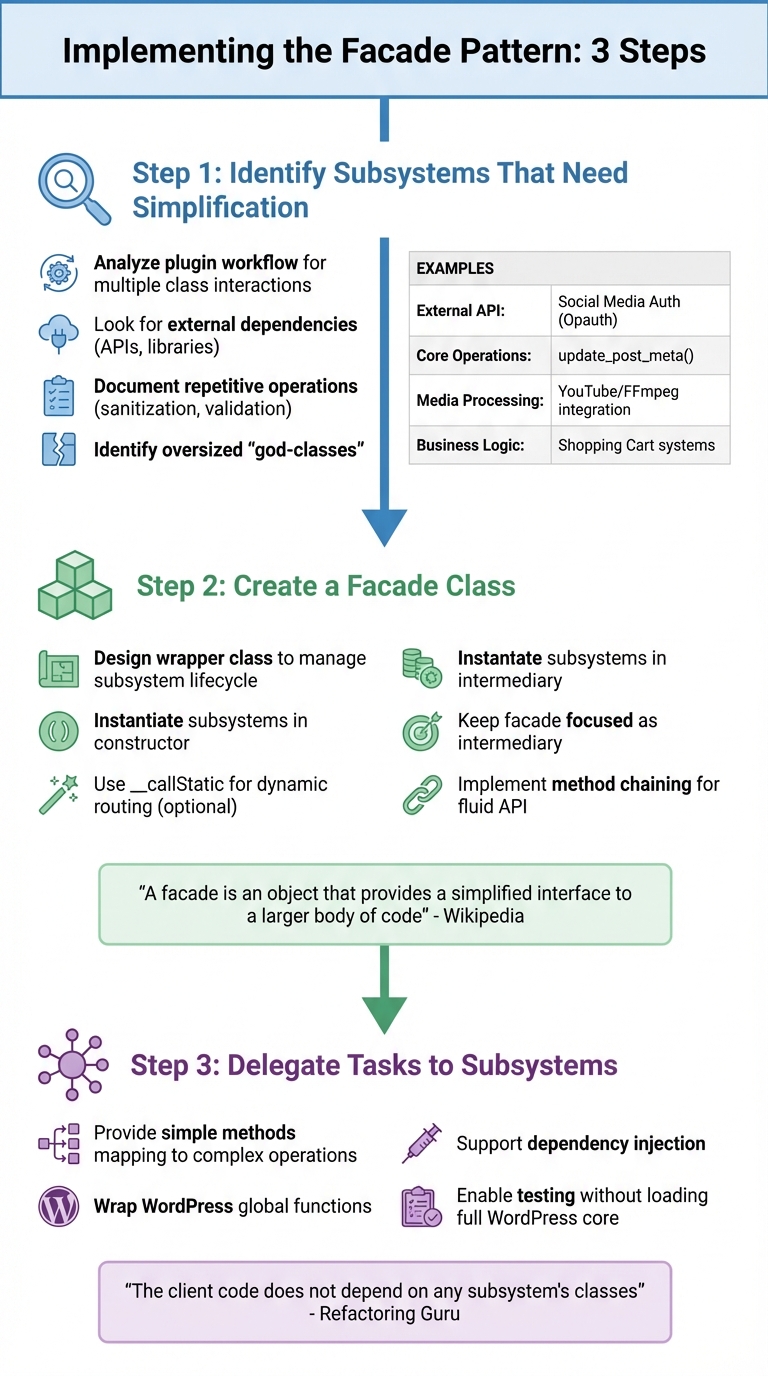
How to Implement the Facade Pattern in WordPress Plugins: 3-Step Process
Simplifying complex subsystems in your WordPress plugin can be achieved by following three essential steps to implement a facade.
Step 1: Identify Subsystems That Need Simplification
Start by analyzing your plugin’s workflow to pinpoint areas where multiple class interactions are required. Common examples include shopping cart checkouts, media embedding, or library borrowing processes – scenarios where complexity often builds up quickly.
Pay close attention to external dependencies like third-party APIs or intricate libraries (e.g., FFmpeg), as they often involve detailed initialization, configuration, and token management. These are tasks developers shouldn’t have to handle manually. Similarly, repetitive operations, such as sanitization or validation, might indicate the need for a facade.
Documenting the steps involved in a typical task can highlight whether developers are forced to manage the lifecycle of multiple objects. This is a strong indicator that a facade is necessary. Oversized "god-classes" that try to manage too many responsibilities can also signal an opportunity to break them into smaller, more manageable subsystems hidden behind a single facade.
| Subsystem Type | Identification Criteria | Example in WordPress |
|---|---|---|
| External API | Requires keys, tokens, multi-step requests | Social Media Auth (Opauth) [2] |
| Core Operations | Repetitive sanitization, validation, DB calls | update_post_meta() [2] |
| Media Processing | Needs external library and file management | YouTube/FFmpeg integration [5] |
| Business Logic | Coordinates inventory, pricing, and checkout | Shopping Cart systems [11] |
Once these subsystems are identified, you can start encapsulating their complexities by designing a dedicated facade class.
Step 2: Create a Facade Class
A facade class acts as a wrapper that manages the lifecycle of your complex subsystems. By instantiating these subsystems within the facade’s constructor, you relieve client code from having to handle initialization. For added flexibility, you might use an abstract facade class with PHP’s __callStatic magic method to route calls to providers stored in a registry [4]. This design also simplifies unit testing, as it allows mocking behaviors without loading the entire WordPress core.
"A facade is an object that provides a simplified interface to a larger body of code, such as a class library." – Wikipedia [2]
Keep the facade focused on its role as an intermediary. It should redirect requests to the appropriate subsystem rather than embedding heavy business logic itself [1]. If the facade begins to accumulate too much logic, refactor those pieces back into the subsystems. To make your plugin’s interface even more user-friendly, consider implementing method chaining by returning $this in setter methods. This creates a smoother, more fluid API [12].
Once your facade class is built, assign specific tasks to the relevant subsystems.
Step 3: Delegate Tasks to Subsystems
The facade should provide simple, concise methods that map directly to the underlying complex operations. For example, a send() method on the facade might internally handle setting headers, body content, and subject lines across multiple subsystem objects [12]. The goal is for client code to interact only with the facade, staying unaware of the underlying complexities [2].
In WordPress development, you can wrap global functions like wp_redirect or add_settings_error within your facade. Supporting dependency injection ensures flexibility and improves performance [4] [5]. This approach also enables comprehensive testing without needing to load the full WordPress core.
"The client code does not depend on any subsystem’s classes. Any changes inside the subsystem’s code won’t affect the client code. You will only need to update the Facade." – Refactoring Guru [5]
Benefits and Limitations of the Facade Pattern
When working with the facade pattern, it’s important to weigh its advantages against its potential drawbacks. While it can streamline interfaces and reduce dependencies, it may also introduce challenges like added maintenance or limited access to advanced features.
Facades are particularly effective at improving code readability and lowering coupling. They also act as a buffer against changes in subsystems. For instance, if WordPress updates a core function or a third-party library rolls out a new version, you only need to update the facade instead of combing through your entire codebase to make adjustments [8][12].
However, there’s a trade-off. Facades can sometimes hide advanced functionality. If the facade only provides access to basic operations, developers needing more complex features might have to bypass it or wait for updates to extend its capabilities [2]. Additionally, facades can inadvertently become "god-classes" if overloaded with responsibilities, creating performance bottlenecks instead of simplifying the system [2][8].
"The facade should simplify the interface and hide the complexity, not introduce additional complexity. Keep the facade focused and avoid bloating it with excessive responsibilities." – Brian Farley [8]
Another challenge is maintenance. Facades require regular updates to stay aligned with changes in the underlying subsystems [8]. Moreover, because they often use dynamic delegation (e.g., PHP’s __callStatic method), code editors might struggle to track type information or flag unused methods [4]. To address this, you can use @method PHPDoc tags to help your IDE better understand the facade’s functionality.
Here’s a quick breakdown of the key benefits and limitations:
Pros and Cons Comparison Table
| Benefit | Description | Limitation | Description |
|---|---|---|---|
| Decoupling | Shields client code from subsystem changes, reducing interdependencies [8][12]. | Risk of Hiding Features | May obscure advanced functionality that developers occasionally need [2]. |
| Enhanced Testability | Makes unit testing easier by allowing subsystems to be mocked [4]. | Performance Bottleneck | Can slow performance if overloaded with logic [2]. |
| Refactoring Support | Helps clean up legacy "god-classes" or messy codebases [1]. | Maintenance Overhead | Requires frequent updates to stay in sync with subsystem changes [8]. |
| Consistency | Ensures sequences of operations are performed uniformly [8]. | Unnecessary Complexity | Adds unnecessary layers in simple systems [12]. |
| Improved Readability | Replaces complex multi-step logic with simple, descriptive method calls [8][6]. | Tooling Confusion | Code editors may lose track of type information or exceptions [4]. |
While the facade pattern excels at simplifying complex systems, it requires careful maintenance and thoughtful application. It’s best suited for scenarios where the benefits of streamlining outweigh the initial setup and ongoing upkeep [3].
Conclusion
The facade pattern provides a simple way to streamline complex plugin interfaces, making your WordPress codebase easier to manage and more adaptable. By creating a single, user-friendly API that hides the underlying complexity, you can spend more time building features instead of dealing with intricate subsystems or third-party libraries.
When you encapsulate complex processes – like WordPress globals, authentication, or data validation – within a facade, you centralize maintenance. This approach means updates or library replacements only require changes in one place, rather than across your entire plugin. It also makes achieving full unit test coverage easier, as you can mock dependencies without needing to run WordPress in its entirety [4]. This simplicity is a key reason why many developers advocate for the facade pattern.
"The facade pattern is a favored design pattern because of how easily it can clean up your code. You have most likely already used this design pattern in your own programming without even realizing it." – Web Dev Simplified [6]
To maximize the benefits, follow a few practical tips. Use the "Rule of Three": wait until you have three distinct implementations before refactoring into a facade to ensure your API stays adaptable. Always wrap third-party libraries to shield your code from breaking changes, and leverage facades as a bridge when modernizing legacy code.
Whether you’re crafting a new plugin or refining an old one, the facade pattern can help you create reliable solutions with less effort. Start by isolating one complex subsystem in your project and refactor it behind a straightforward interface. This method not only aligns with the WP Winners philosophy of efficient WordPress development but also equips you to build stronger plugins with ease.
FAQs
When should I use a facade in a WordPress plugin?
When building a WordPress plugin, a facade can come in handy for simplifying complex systems, organizing APIs, or handling dependencies more efficiently. It’s particularly useful when dealing with legacy code, third-party libraries, or complicated internal structures. By providing a streamlined and clean interface, facades hide the underlying complexity, making your plugin easier to use, extend, and integrate with other tools or systems.
How do I prevent a facade from becoming a god class?
To prevent a facade from becoming a god class, stick to key principles like separation of concerns and the Single Responsibility Principle. Each class should serve a single, well-defined purpose. If a facade grows too large, break it into smaller, more focused components. Leveraging modular design patterns can also help. These steps ensure the facade remains a straightforward, manageable interface without becoming overly complex.
Can facades make unit testing WordPress plugins easier?
The facade pattern makes unit testing WordPress plugins much more manageable by offering a simplified interface to otherwise complex subsystems. This approach allows developers to isolate code for testing without getting bogged down in the intricate details of underlying components. By reducing dependencies and encapsulating complexity, the facade pattern encourages modular and maintainable code. As a result, the testing process becomes smoother and more efficient.